TenTrix Blast
Loading TenTrix Blast...
Please wait while the game loads
What is TenTrix Blast?
TenTrix Blast is a free browser block puzzle in which you drag shapes onto a grid, clear the rows and columns you complete, and try to keep room for the next piece, with four modes on its menu: Classic, Time, Black and Blast.
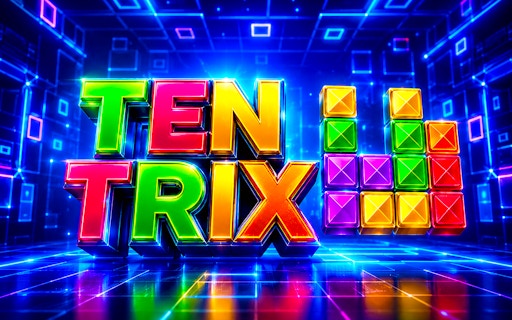
TenTrix Blast opens with its own blue loading screen, counting up in per cent, and then a title card that spells the name in multicoloured block letters. Under it sit a single play button and two round toggles, one for music and one for sound effects.
Press play and TenTrix Blast asks you to choose a mode. Classic puts a ten-by-ten grid in the middle of a blue, tunnel-like backdrop, with three pieces waiting underneath and a trophy at the top that tracks your best score beside the current one. A home button and a pause button sit in the top corners.
It is a portrait game, listed in the GamePix catalogue since 2022, and it borrows its name from TenTrix, the 10×10 block puzzle already on this site. If you have played that one, the shapes and the grid will feel familiar; the mode menu and the glowing tunnel behind the board are what you notice first in TenTrix Blast.
How to play TenTrix Blast
- 01
Load and press play
Wait for the blue loader to reach 100 per cent, then press the large play button on the TenTrix Blast title card. The music and sound toggles beneath it can be switched off first if you prefer silence.
- 02
Pick a mode
The SELECT MODE panel lists Classic, Time, Black and Blast. Classic is the TenTrix Blast mode we tested and the natural place to begin.
- 03
Read the three pieces
Three shapes wait beneath the ten-by-ten grid. Look at all of them before moving any, because the order you place them in decides how much room is left for the last one.
- 04
Drag a piece onto the grid
Press on a shape and drag it upwards. TenTrix Blast draws the piece above your pointer rather than under it, so aim with the shape you can see, not with the cursor.
- 05
Complete rows and columns
A full row or full column is how you win space back. Build towards lines that are nearly complete instead of scattering pieces across the board.
- 06
Keep going until nothing fits
Each placement adds to the score beside the trophy. The catalogue listing says a game of TenTrix Blast ends when you run out of space, so the real goal is to keep the grid open.
Controls
TenTrix Blast is played with drag and drop. On a computer, hold the left mouse button on a piece, move it over the grid and release. In our session the piece was drawn roughly a finger's width above the pointer — the drop landed about 90 pixels higher than the cursor — which would keep the shape visible under a thumb but takes a few moves to get used to with a mouse. Home and pause sit in the top corners of the board screen, and music and sound have their own toggles on the title card.
Objective
Place pieces, complete rows and columns, and keep room on the board for each new set of three. The trophy readout shows your best score next to the current one; when we placed a three-cell shape on an empty Classic board, the current score jumped from 0 to 30. Our session ended before the first cleared line, so we cannot say how much a clear is worth in TenTrix Blast. According to the GamePix catalogue listing, a game ends when you run out of space.
Game modes & features
The SELECT MODE panel offers four modes, each on its own coloured button with an icon: Classic, Time, Black and Blast. We played Classic, which uses a ten-by-ten grid with three pieces in the tray below and a tutorial hand on the very first move to demonstrate the drag. TenTrix Blast does not explain the other three modes on its menu, and we did not open Time, Black or Blast, so their names are all we can honestly report about them.
Why play TenTrix Blast?
Play it if you enjoyed TenTrix and want the same kind of puzzle with more choice on the menu. A ten-by-ten Classic board is roomy enough to absorb a few awkward pieces early on, which makes it a calmer start than smaller grids, and the three-piece tray rewards a moment of planning before every move. The neon tunnel gives TenTrix Blast more atmosphere than most grid puzzles, and a session can be as short as one board.
TenTrix Blast tips
Aim with the shape, not the cursor
Because TenTrix Blast lifts the piece above the pointer, release when the shape itself is over the target cells. Watching the cursor makes pieces land a row too high.
Fill the edges first
Lay early pieces along the borders of the grid. Edge rows and columns are easy to complete and leave the centre free for awkward shapes.
Place the biggest piece first
When the tray holds one large shape and two small ones, put the large one down while the board still has room for it. Small pieces can squeeze into gaps later.
Learn the board in Classic
Get used to the drag and the ten-by-ten grid in Classic before trying the other three modes. It is the one mode with no unexplained rules attached.
Keep one open region
Big pieces end runs when there is no block of empty cells large enough for them. Keep one corner region clear so the largest shape the tray can deal always has a home.
Check all three before committing
Before placing the first piece of a set, confirm that all three can fit in the order you plan. Placing two neatly and stranding the third wastes the whole set.
Finish a row and a column together
Line up a row and a column that are both one piece short and close them with the same shape. A double clear frees far more space than two single ones.
Avoid one-cell holes
An isolated empty cell can only be filled by a single-cell piece, if one ever arrives. Keep gaps at least two cells wide wherever you can.
What makes TenTrix Blast special
TenTrix Blast stands out first for its look. The blue tunnel lines behind the grid and the multicoloured title lettering make it feel closer to an arcade cabinet than a spreadsheet, which is the usual risk with grid puzzles, yet the board itself stays plain and easy to read.
The second strength of TenTrix Blast is choice. Four modes on one menu is more than most browser block puzzles put in front of you, and the scoring is visible from the first move: thirty points for our opening three-cell piece showed that every placement counts, not only every clear.
Within this site's collection it sits beside TenTrix, its 10×10 namesake, and it makes a useful contrast with Block Breaker, where the wall is already built and your job is to knock it down. In TenTrix Blast you build the wall yourself and clear it a line at a time. If you want a tighter board after a few rounds, 8x8 Block Puzzle is the next step down in size.
TenTrix Blast features
Four modes
Classic, Time, Black and Blast, each with its own button on the SELECT MODE panel.
Ten-by-ten board
Classic uses a 10×10 grid, the same size as the original TenTrix.
Three-piece tray
Three shapes wait below the grid; plan the order before you drag.
Live score and best
A trophy readout at the top shows your best score beside the current one.
Lifted pieces
Shapes are drawn above the pointer, so they stay visible while you drag.
Music and sound toggles
Two buttons on the TenTrix Blast title card switch music and effects separately.
TenTrix Blast FAQ
QHow many modes does TenTrix Blast have?
Four. The SELECT MODE panel lists Classic, Time, Black and Blast. We played Classic, which uses a ten-by-ten grid with three pieces below it. The menu does not describe the other three and we did not open them, so we cannot say how they differ.
QHow big is the board in TenTrix Blast?
In Classic mode the board is a ten-by-ten grid, set against a blue tunnel backdrop with three pieces waiting underneath. That matches TenTrix, the original 10×10 game on this site. We did not check whether the other modes use the same grid.
QHow does scoring work in TenTrix Blast?
Placing pieces scores on its own. When we dropped a three-cell shape onto an empty Classic board, the score went from 0 to 30, with a trophy readout showing the best score beside it. We did not reach a cleared line, so the size of any clearing bonus is unknown to us.
QHow do you place a piece in TenTrix Blast?
Press on one of the three shapes below the grid, drag it over the board and let go. TenTrix Blast draws the piece above your pointer, roughly 90 pixels higher in our test, so line up the visible shape with the empty cells rather than the cursor.
QHow do you last longer in TenTrix Blast?
Keep space open. Build complete rows and columns along the edges, place the largest of the three pieces first, and leave a roomy empty area for big shapes. According to the catalogue listing the game ends when you run out of space, so every isolated hole shortens the run.
QIs TenTrix Blast the same as Block Blast?
No. TenTrix Blast is an independent browser game that shares only the drag-and-place idea with Hungry Studio's Block Blast!, a mobile app released in 2022. TenTrix Blast runs in the browser with no install, offers Classic, Time, Black and Blast modes, and uses a ten-by-ten board in Classic.
QCan you play TenTrix Blast on a phone?
It should suit one. The game is laid out in portrait, every action is a drag, and the piece is drawn above the pointer so a finger would not hide it. Our own test was on a desktop browser with a mouse, though, so we cannot confirm how TenTrix Blast performs on a mobile device.
QWhat games are similar to TenTrix Blast?
TenTrix is the closest, with the same ten-by-ten board idea. Color Blocks and 8x8 Block Puzzle use smaller eight-by-eight grids, Wood Block Puzzle offers four modes on a wooden board, and Blocks Puzzle adds a fifteen-minute countdown to each round.
Ready to play TenTrix Blast?
Press play, choose Classic and see how long you can keep the ten-by-ten grid open in TenTrix Blast.
Play TenTrix Blast — It's Free